
AI ChristmasCard Generator
Your photo, a Christmas scene and your greeting on one card.
Aspect ratio
Free: 5 credits Auto-deleted in 24h
Use only your own photos or ones you have permission to use. · Terms
To make an AI Christmas card, upload a family, couple or pet photo, pick a Christmas scene, and let the AI create the portrait. Then add a greeting like "Merry Christmas", sign it with your family name, choose a font and border, and download a PNG or a 5×7 print-ready file.
How to make a Christmas photo card
- 1
Upload your photo
A family snapshot, a couple selfie or the dog on the sofa. The card uses a portrait 3:4 shape by default.
- 2
Create the Christmas portrait
Choose a scene (Elegant Holiday Studio works well for cards) and the AI dresses the photo for Christmas. 5 credits; your first one is free.
- 3
Write and download your card
Pick a greeting, add your names, choose font, color and border, then download a PNG or a 5×7 print file.
Real results
Card-ready Christmas portraits
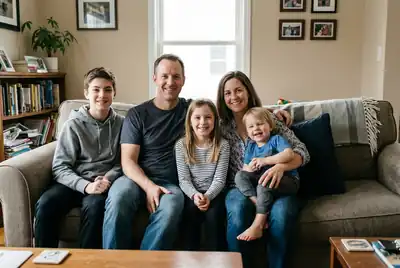
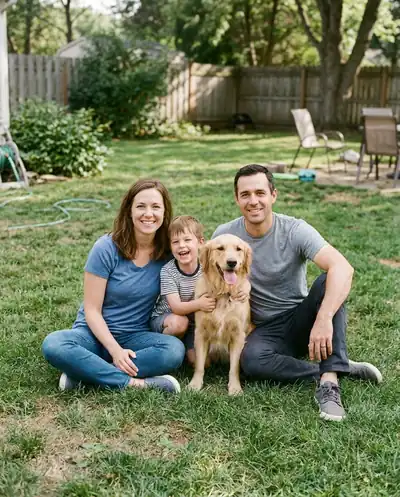
Start with a portrait like these, then add your words. Studio, fireplace and snowy scenes leave nice space for a greeting.
 Before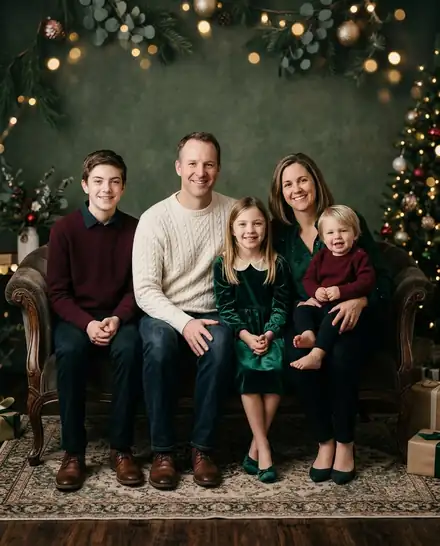
 Before
 Before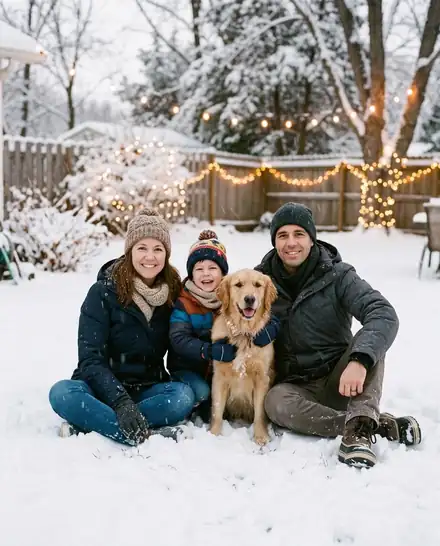
 Before
 Before
 Before
All people and pets in these examples are AI-generated; no real customers' photos are shown.
A card maker that starts with a better photo
AI portrait first
Most card makers just put text on your snapshot. Here the photo itself becomes a Christmas portrait first.
Greetings and signatures
Merry Christmas, Happy Holidays, Season's Greetings, Joy · Peace · Love, or your own words, plus a signature line.
Fonts, colors and borders
Five fonts from script to vintage serif, four colors, and borders from a clean white frame to snowflakes and holly.
Print-ready 5×7
Export a 1500×2100 pixel file (5×7 inches at 300 dpi) for home printing or a photo lab.
Card design is free
You only pay for the AI portrait. Text, borders and every download after that cost nothing.
Private, auto-deleted
Uploads and results are deleted 24 hours after you make them. We never use your family photos to train AI.
An AI Christmas card generator that starts with the photo
Most Christmas card makers give you a template and ask you to drop in a photo. If the photo is a blurry snapshot from the park, the card still looks like a blurry snapshot from the park. This card generator fixes the photo first: the AI turns your picture into a festive portrait (by the fireplace, in a snowy garden or in an elegant holiday studio) while keeping everyone's real face.
Then the card editor takes over. Add a greeting, sign it with your names, choose a font, a color and a border, and download it. The editing happens right in your browser, so changing the text a dozen times costs nothing.
Designing your Christmas photo card
The editor keeps the choices simple, so the card looks good whatever you pick:
- Greeting: Merry Christmas, Happy Holidays, Season's Greetings, Merry Christmas & Happy New Year, Joy · Peace · Love, or your own words.
- Signature line: "Love, The Johnsons · 2026" or anything up to 60 characters.
- Fonts: script, handwritten, classic serif, vintage and a jolly holiday font.
- Colors: snow white, gold, Christmas red and pine green, with a soft shade behind the text so it reads on any photo.
- Position: top, center or bottom, so the text never covers a face.
- Borders: none, a white frame, a thin gold line, snowflakes or holly.
Christmas card messages you can use
Need words for the inside or the signature line? Here are twenty that fit on a photo card:
- Merry Christmas from our family to yours.
- Wishing you a season full of light and laughter.
- Peace, love and plenty of cookies.
- Warmest wishes for a cozy Christmas.
- May your days be merry and bright.
- Joy to you and yours this Christmas.
- Thinking of you this holiday season.
- Merry everything and happy always.
- Love and hugs from our house to yours.
- Here's to a year of new memories.
- Wishing you calm, comfort and joy.
- Sending holiday cheer across the miles.
- From our messy, happy home: Merry Christmas.
- Fa la la la la, la la la la!
- Grateful for you this Christmas and always.
- Wishing you a white Christmas and a bright New Year.
- Our family grew this year, and so did our love.
- Home is wherever we're together.
- Cheers to twelve months of new adventures.
- Merry Christmas and a happy, healthy New Year.
Printing a 5×7 Christmas card
Use the 3:4 Card shape when you create the photo (it is selected for you in Card mode). When you press "For print (5×7)", the editor exports a 1500×2100 pixel PNG, which is 5×7 inches at 300 dpi, the standard size for photo cards. Upload it to any photo lab or print it at home on photo paper.
For a digital card, "Download PNG" keeps the original size of your Christmas portrait. That file is ready to send on WhatsApp, iMessage or email, or to post as a holiday greeting.
What it costs and how long it takes
Creating the AI portrait costs 5 credits and usually takes under a minute. Your first one is free: every device gets 5 free credits, no account needed. Everything in the card editor (text, fonts, borders and all downloads) is free. Want Santa on the card instead? Make the photo with add Santa to photo, then tap "Make it a card". For more portrait styles, start from the AI Christmas photo maker.
Uploads and results are deleted after 24 hours, so download your finished card before then.
Where your card goes
Printed family cards
A 5×7 photo card for the mantelpiece, the fridge and the grandparents.
Digital greetings
Send a card by WhatsApp, iMessage or email in seconds.
Holiday posts
Share your card as your Christmas post on Facebook or Instagram.
Pet cards
Your dog or cat in a Santa costume, signed "Love, Biscuit".
AI Christmas card FAQ
Upload your photo in Card mode, pick a Christmas scene and press Create. When the AI portrait is ready, choose a greeting, add your names, pick a font, color and border, then download a PNG or a 5×7 print file.
More Christmas tools
This year, send a card worth keeping
A real family photo, a Christmas setting and your own words.