The AI Christmas Photo Trend: How to Do It (+ Prompts)
2026-10-29
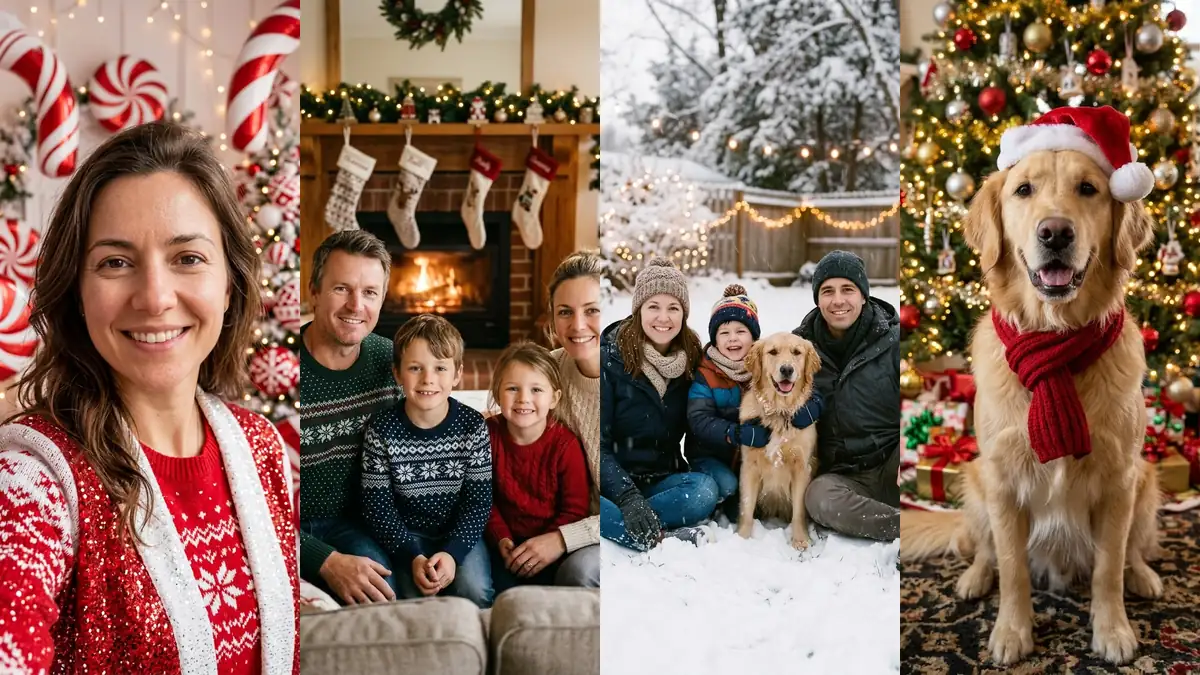
The AI Christmas photo trend is simple: take an ordinary selfie, couple shot, family picture or pet photo, and turn it into a festive holiday portrait that looks like a professional photoshoot. Fireplace, snow, matching pajamas, a red-and-white candy cane studio. The faces stay yours; everything around them becomes Christmas. Below are the looks people are making, prompts you can copy, and the mistakes that make a result look fake.
What Is the AI Christmas Photo Trend?
Every December, feeds fill up with holiday photos nobody actually staged. Someone posts a candy cane glam shot, a family appears in front of a fireplace they don't own, a golden retriever shows up in a Santa hat and scarf. The source is almost always a phone photo plus an image AI that edits the scene while keeping the people.
Two things made it take off. Image models got good at keeping a real face while changing clothes, lighting and background, so the result looks like you rather than a stranger. And the output is instantly useful: a Christmas card photo, a profile picture for December, a story post, or something to send to the family group chat.
The Looks Everyone Is Making
Most AI Christmas pictures fall into a handful of styles. Pick one before you start, because a clear look gives a cleaner result than "make it Christmassy".
- Candy cane studio. Red and white everything, giant candy canes, peppermint swirls, glossy light. This is the viral one this season; we made a dedicated candy cane picture page for it.
- Cozy fireplace. Knit sweaters, stockings on the mantel, warm firelight. The safest pick for a family Christmas card.
- Snowy wonderland. Coats, beanies, falling snow and string lights at dusk. Works well with dogs.
- Matching pajamas. Everyone in red plaid by the tree on Christmas morning, pets in a matching bandana.
- Ugly sweater party. Loud reindeer knits and tinsel. Good for friend groups and office chats.
- Vintage 1950s. Faded film colors, a tinsel tree and retro outfits.
- Santa in your home. Not a portrait at all: a photo of your living room with Santa leaving gifts, or a fake security-camera frame of Santa caught on camera.
How to Do It in Three Steps
The fastest way is a tool with the scenes built in, so you never write a prompt:
- Upload a photo. Open the AI Christmas photo generator and add a selfie, couple, family or pet picture.
- Pick a scene and a shape. Choose one of 13 scenes, then 9:16 for Stories and Reels, 4:5 for a feed post, 1:1 for a profile picture or 3:4 for a card.
- Create. The picture is usually ready in under a minute. Download it, try another scene on the same photo, or turn it into a card or a short video.
Your first picture is free with no sign-up: every device gets 5 free credits, which is one photo. After that a photo costs 5 credits from one-time credit packs, with no subscription.
Copy-Paste Prompts for ChatGPT, Gemini or Any Image AI
Prefer a chatbot? These are the scene descriptions we use on this site, trimmed for pasting. Upload your photo first, then paste one prompt and add the "keep" line at the end every time. That last line is what stops the AI from quietly swapping your face for a prettier stranger.
Candy cane: Turn this photo into the viral AI candy cane Christmas photo trend: the same people in a dreamy red-and-white candy cane themed studio set, giant candy canes, peppermint swirls, red and white outfits with a touch of glitter, soft glossy lighting, glamorous holiday photoshoot.
Fireplace: Turn this photo into a warm, professional Christmas portrait: the same people sitting together in front of a cozy lit fireplace with stockings and garland, wearing cozy knit Christmas sweaters, soft golden firelight, bokeh fairy lights.
Snow: Turn this photo into a magical winter Christmas portrait: the same people outdoors in a snowy wonderland at dusk, gentle falling snow, warm winter coats, scarves and beanies, string lights in the background.
Matching pajamas: Turn this photo into a Christmas morning portrait: everyone wearing matching red plaid Christmas pajamas, sitting on the living room floor by the Christmas tree with presents, warm morning light. Pets wear a small matching plaid bandana.
Pet in a Santa hat: Turn this photo into a cute Christmas pet portrait: the same pet wearing a small Santa hat and a red scarf, sitting in front of a decorated Christmas tree with presents and warm fairy lights. Keep the pet's breed, fur color, markings and face exactly the same.
The "keep" line (add to every prompt): Keep every person's and pet's face, identity, skin tone, hairstyle, hair color, age and body shape exactly the same as in the input photo; same number of people and pets, nobody added or removed, and no extra people in the background. Photorealistic, natural skin texture, no text, no watermark.
Tips for a Result That Looks Like You
- Use a sharp, front-facing photo. Soft daylight beats a dim restaurant. Faces that are tiny or turned away are the ones that drift.
- Keep the background clean. Strangers behind you can get dressed up and pulled into the scene. We saw this in testing with a busy café background in the vintage look.
- Groups are fine, within reason. In our tests a three-generation family of six kept every face. Make sure each person is visible and not cut off at the edge.
- Change one thing at a time. If a result is close, remake it with one extra detail ("red sequin dress") instead of rewriting the whole prompt.
- Skip long text on signs. Short words like "Merry Christmas" usually render; long sentences often come out misspelled.
Beyond the Portrait: Santa, Cards and Videos
Once you have a photo you like, the trend keeps going. You can add Santa to a photo of your living room so the kids find "proof" on Christmas morning, turn the portrait into a greeting card with the AI Christmas card generator (greetings, fonts, borders and a 5x7 print file, free), or animate it into a short clip with the AI Santa video tool, where Santa tiptoes past a security camera or the whole family waves.
FAQ
How do I do the AI Christmas photo trend?
Upload a clear selfie, couple, family or pet photo to an AI Christmas photo generator, pick a scene such as candy cane, fireplace or snow, and create. With a chatbot instead, upload the photo, paste a scene prompt and add a line telling it to keep every face exactly the same.
What is the ChatGPT prompt for the Christmas photo trend?
There is no single official prompt. The ones that work describe one clear scene (set, outfits, lighting) and end with an instruction to keep each person's face, skin tone, hair and age unchanged and to add nobody. The prompts above are the scene descriptions this site uses.
Is there a free AI Christmas photo generator?
Yes. On AI Christmas Photo your first picture is free with no sign-up, because every device gets 5 free credits. More pictures cost 5 credits each from one-time packs.
Can I make an AI Christmas photo of my dog or cat?
Yes. Pets work in every scene, and the Pet in Santa Costume scene is made for them. In our tests a golden retriever and a ginger cat both kept their breed, fur color and markings.
Will the AI change my face?
A good tool or prompt keeps it. Faces change most when the photo is blurry, the face is small, or the prompt describes how people should look. Use a sharp photo and always include the "keep" instruction.